Experimenting with AI4
What happens if you give an agent a new tool halfway through a conversation? In Field you can write that tool in a box, run it, and ask the agent to use it straight away. You can also change the instructions and state it works with, rewind a conversation, and try another branch.
We'll do that with an agent that paints, then look at ways to inspect and measure the experiment.
The document on this page is the ai4_paint_studio
starting point: the Studio box from AI4 Paints and the Scribbler box shown
below. It needs the paint library (./gradlew buildPaintNative) and an AI provider.
A tool written in the middle of a conversation
The Studio box gives the chat a set of paint tools for a simulated oil canvas. After the painter had
laid in a simple landscape, a second box was added beside it, Scribbler, which defines one more tool
with aiTool { }: a scribble that fills a region with looping, wandering lines of paint. Running
the box registered the tool. The next request asked the painter to use it, and it did, in the same
panel and the same conversation. Here is the result, with the Scribbler's code open in the editor:
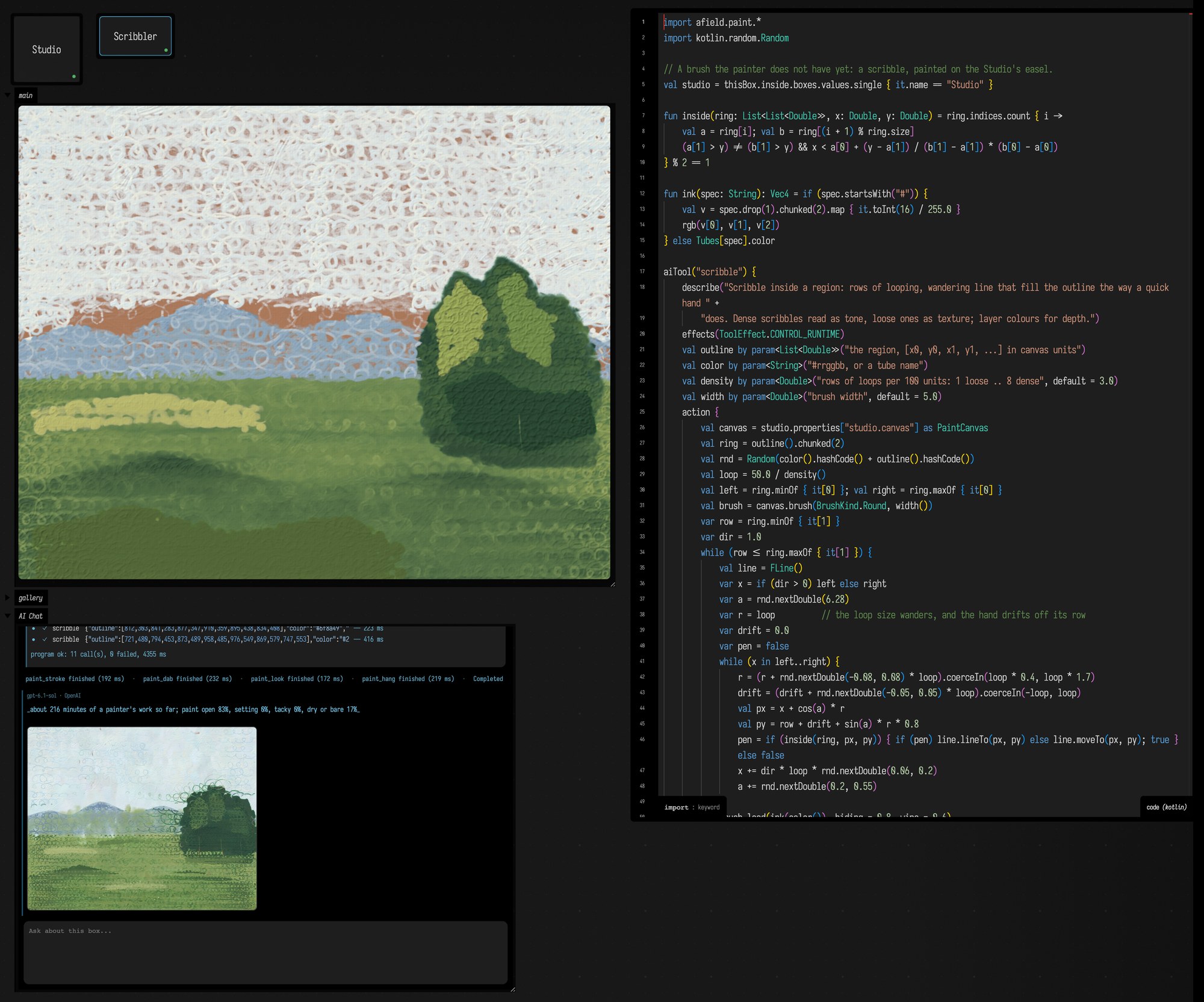
The whole tool is ordinary box code. It finds the Studio's canvas, works out the scribble, strokes
it with a paint brush, and asks the Studio to show the result. Studio publishes typed
studioCanvas and refreshStudio callbacks; the canvas callback reads the current easel even
after a conversation rewind replaces it:
prop<() -> PaintCanvas>(studioCanvas)
prop<() -> Unit>(refreshStudio)

aiTool("scribble") {
    describe(
        "Scribble inside a region: rows of looping, wandering line that fill the outline the way a quick hand " +
            "does. Dense scribbles read as tone, loose ones as texture; layer colours for depth.",
    )
    effects(ToolEffect.CONTROL_RUNTIME)
    val outline by param<List<Double>>("the region, [x0, y0, x1, y1, ...] in canvas units")
    val color by param<String>("#rrggbb, or a tube name")
    val density by param<Double>("rows of loops per 100 units: 1 loose .. 8 dense", default = 3.0)
    val width by param<Double>("brush width", default = 5.0)
    action {
        val canvas = studio.studioCanvas()
        // ... the scribble, row by row, inside the outline ...
        studio.refreshStudio()
        "scribbled ${color()} over the region at density ${density()}"
    }
}
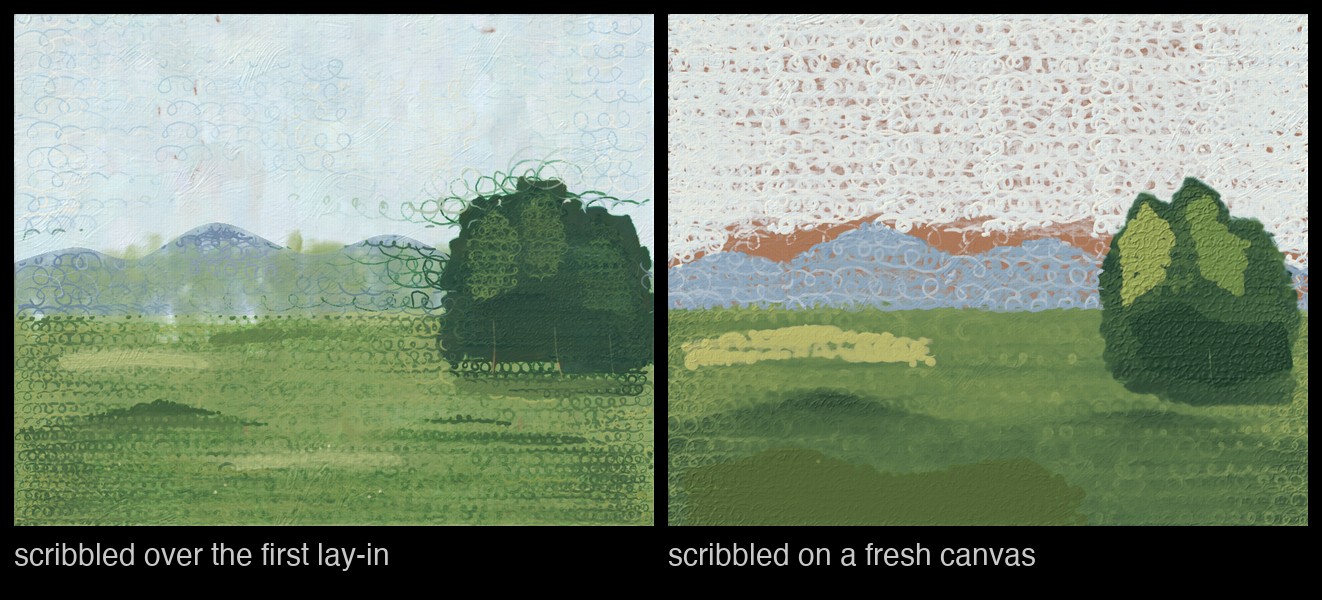
describe and the parameter descriptions are what the model reads, so they are where you say what
the tool is for. The painter read them and chose its own colours, densities and widths: fine, pale,
loose scribbles for the sky, wide and dense ones for the tree and the field, which close up into
almost solid masses. It painted twice with the tool, once over the landscape it had laid in and once,
asked for a painting made almost entirely of scribble, on a fresh canvas:
Re-running the box replaces the tool in place, so you can change how the scribble looks, or what it takes, between one request and the next. A tool lives as long as the box that registered it. Give the AI a tool of your own has the whole DSL, and More than a tool adds context, chat commands, checks before and after each call, and state that follows the conversation.
Many calls at once
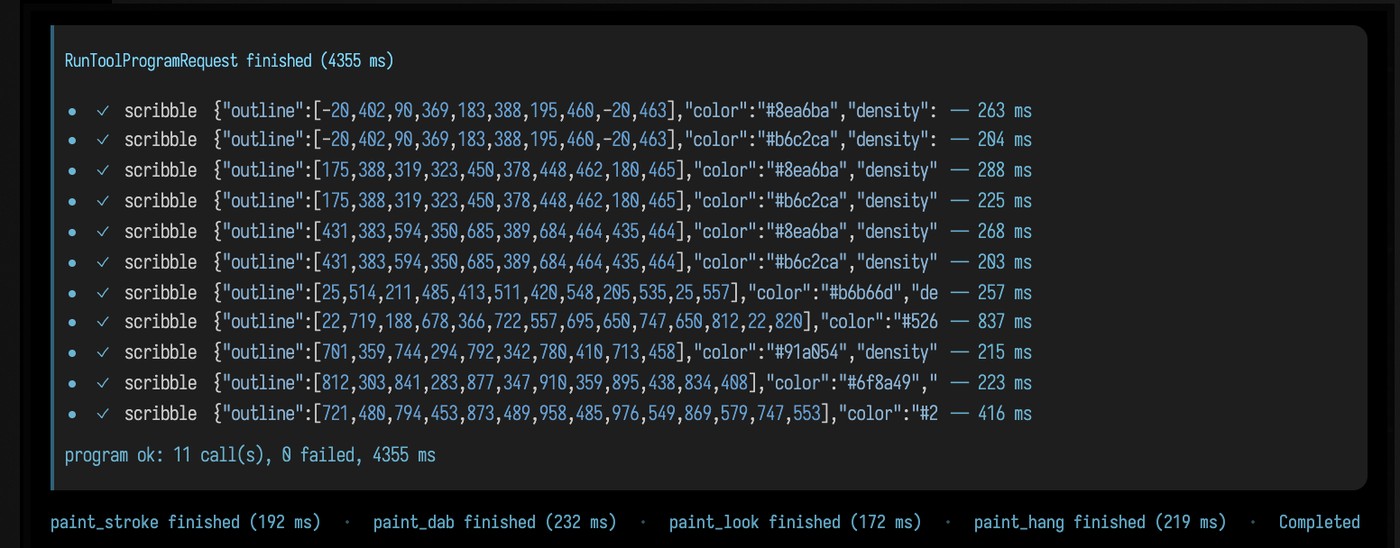
For the second painting, the painter wrote four short JavaScript programs using the Studio's
tools. Each called scribble as often as it needed and returned one result. Open a program's line
in the chat to see its individual calls and their timings; the pictures taken between stages appear
there too:
A program sees only the conversation's tools, with no files, network or Java. A call that fails
stops the program, so a failed check cannot be followed by the edit it was guarding.
tools.X.raw(...) returns a failure without throwing, and check(...) stops on a result that ran
but is not acceptable. progress(...) shows a line in the panel while the program runs. A result too
large to keep in the conversation is stored whole, and the call's record says where.
Many calls at once has the details.
Branching an experiment
Hover over one of your requests in the chat to rewind to just before it, or to edit it and send it
again. The later requests are kept as a branch, and /branches and /branch <n> switch between
them. What the box keeps for the conversation goes back too: the Studio's canvas is restored to how
it was before the request you rewound to, and switching branch brings back that branch's canvas.
AI4 Paints shows one conversation that branched into a night and a stormy morning
from the same dusk painting.
branchState is how a box hands its state to the conversation. Before restoring, Field saves the
state as it is now and compares it with the state the conversation last left. If something else
changed it, a person dragging or a tool run from outside the chat, the state is left as it is and the
chat says so, unless the box asks for the conversation's version to win. After a rewind, Field also
offers to undo the document edits the abandoned requests made, and leaves alone any box someone has
edited, moved or connected since.
Seeing what the agent was told
/context in a box's chat lists what the last request sent besides the conversation: each part of
the instructions, its size, whether it changes from turn to turn, and what the provider keeps of it.
The last differs by provider. OpenAI keeps the conversation on its side, so context that changes
between turns is added with every turn. /help lists the commands the document's extensions add,
such as the Studio's /canvas, /palette and /gallery.
Each turn's record in the conversation tree also notes the model, the instructions, the tools that were offered and the source revision of every box that contributed a tool, so a result can be traced back to what produced it.
Measuring a change
The same AI chat can be driven without the panel, from a script, to compare two versions of an
experiment. agent-task runs one request in a document and checks the result. agent-eval runs a
suite of tasks, each in its own scratch document. Both report rounds, tokens (cached and not), time
and every tool call, including the calls inside programs. Both come from tools/field_backdoor.py
in the Field repository:
uv run --project . --group backdoor python tools/field_backdoor.py --json --scratch \
  --command "agent-task --goal 'Make a box named Squares that prints the squares of 1 to 8, and run it.' \
     --check box-exists:Squares --check output-ints-include:Squares:1,4,9,16,25,36,49,64"
The verdict comes from the checks, whatever the agent reports. Checks can test boxes, outputs, pictures
of outputs, and which tools and effects a turn used. --mode scripted replays a list of tool calls
without a model, which is how a tool is tested. --chat-box <box> runs the request as that box's
real panel turn. Two switches compare versions in the same build: --programs off withholds tool
programs, and --context legacy sends the instructions once, in the conversation's stored message, instead of
assembling them each turn.
Measured this way, on OpenAI gpt-6-astra, one or two runs per arm:
| tasks | change | rounds | input tokens |
|---|---|---|---|
| three tasks of many similar calls | tool programs off → on | 29 → 10 | 260k → 119k |
| two conversations of three and four requests | instructions in the stored message → assembled per turn | 17 → 15 | 308k → 192k |
These are small samples on one model, on tasks chosen to need those features. Repeat them on your own work before relying on them.
Scoring AI4 as a reader of these docs
A measurement does not have to be about boxes. The
ai4_cold_reader starting point is one box with two tools:
cold_read_page returns a page of this site as it stood at a git revision, with numbered lines, and
report_stall records one place a newcomer would get stuck: a term used before it is explained, code
shown before the text says what it does, a sentence about how the page was made. Each stall is a
line of JSON with the page, line, category, the quoted words and a note. Run the box, then ask its
chat to cold-read a page, or hand the same request to agent-task in the backdoor invocation that ran
the box:
uv run --project . --group backdoor python tools/field_backdoor.py --json --document coldreader \
  --command 'transcript run ai4_cold_reader' \
  --command "agent-task --goal-file cold_read_staging.txt --max-rounds 48 --check tool-ok:report_stall"
tool-ok:report_stall passes only if at least one report_stall call succeeded; tool-used would
pass on calls that all failed. A live agent-task uses only the local provider unless you add
--allow-remote-provider (or set AFIELD_AGENT_TASK_ALLOW_REMOTE=1), because any other provider
receives the page text. The result's offMachine field records whether the page text left the machine.
tools/cold_reader_score.py compares the stalls with a list someone else made of the same page at
the same revision. A stall counts as found when the quoted words overlap (one quote contains the
other, or they share four words in a row), or when it is within a line and has the same category.
Four pages, read by OpenAI gpt-6.1-sol at the revision an earlier review of them used, once each:
| page | stalls reported | stalls in the review | found in both | precision | recall |
|---|---|---|---|---|---|
installation.md |
10 | 6 | 1 | 0.10 | 0.17 |
staging.md |
8 | 12 | 6 | 0.75 | 0.50 |
sound.md |
13 | 10 | 2 | 0.15 | 0.20 |
kotlin_overview.md |
16 | 10 | 5 | 0.31 | 0.50 |
| all four | 47 | 38 | 14 | 0.30 | 0.37 |
The earlier review is not a complete list of what is wrong with a page, so low precision here
mostly means the two readers stopped at different places. Of the 20 stalls on installation.md and
sound.md the review did not have, 17 read as real on a second look: terms such as JEP,
personalJar and onset recall used without a word of what they are. Of the other three, two were weak
complaints about the page's own making, and one was an ??? aside reported as being about how the
page was made, which is where such text belongs. Each
page took one turn of two to nine rounds and under a minute.
The same model given the same prompt, tools and pages through the plain OpenAI API, without Field, scored the same: 0.30 and 0.32 precision and 0.37 recall in two runs, and its stalls overlapped AI4's about as much as its two runs overlapped each other. For reading a page, running inside Field does not make the model a better reader; it puts the reading in a box you can open and continue.
Where it stops
- A program is not a transaction. Edits made before a failure stay. They are recorded and undoable like any other agent edit, but nothing rolls them back.
- State a box hands to the conversation is saved after every request that changes it: about 28 MB
each for a canvas the size of the Studio's. States no conversation refers to are deleted on their
own; to free the rest,
pruneAiStates(dryRun = false)in the box keeps the latest three along every branch and the state at every fork. WithoutdryRun = falseit only reports what it would free. - A check that must hold, such as a design revision, belongs in the tool that does the work. A
beforeToolguard is a second line, and it sees only calls that go through the chat's tools. - The chat is not a place for long jobs. A tool call waits at most as long as the program it is in has left, so a tool for a minutes-long job should start it and return a handle. For a derived build, the agent can then end its turn and let Field wait: see Let AI4 Wait for Long Builds.
See also: AI4 Paints, AI Overview, Automating Field.
How these figures were made
From live panel turns on 2026-10-04, OpenAI gpt-6.1-sol, in one conversation: a quick landscape
with the paint tools, then the Scribbler box created and run, then two requests to paint with the
new tool, the second on a fresh canvas. The requests were sent as real panel turns from
tools/field_backdoor.py (agent-task --chat-box Studio). The screenshots are from that
document reopened in the backdoor's browser: the editor opened on the Scribbler's code, the Studio's
painting and chat panels sized through the output panels' own setSize, a program's trace opened,
the canvas panned with setCanvasZoom so the boxes sit beside the editor, and the page captured
with a transcript drive step (ui.shot), then cropped. The measurements are the end-state runs
recorded in dev_docs/ai/AI4_PI_LESSONS.md.