Kotlin Syntax Overview (for Python + JavaScript folks)
Field uses Kotlin, a terser "better Java" from JetBrains that runs on the JVM. Field uses it because it can call the whole Java ecosystem, and because operator overloading makes graphics math pleasant to write.
For live coding, Kotlin gives Field a useful combination: the compiler catches many mistakes before execution, and static types let completion and navigation offer specific help. The tradeoff is that some experiments need more explicit types and conversions than their Python or JavaScript equivalents. This document introduces the Kotlin used in Field.
Basics
Comments
Comments are notes for humans — the compiler ignores them. They’re a good place to explain why something is written a certain way, or to temporarily disable a line while you experiment. Kotlin is just like JavaScript here.
:::static
// single-line
/* block comment */
Swift and C# also use // for single-line comments, and /* ... */ for block comments.
In Python you use # for line comments; there’s no true block comment (triple-quoted strings are sometimes used as “docstrings/comments”).
Variables: val vs var
Almost everything you do in code starts by naming a value so you can use it later. Kotlin makes you choose whether that name can be reassigned: use val for “this name won’t change” and var for “this name can change”. Kotlin will also usually infer the type from the value you assign.
:::static
val name = "Ada" // name is "Ada" (and you can't reassign it)
var count = 0 // count is 0 (and you can change it)
count += 1 // count is now 1

// name = "Lady Ada"  // doesn't compile: val can't be reassigned
In Python, names are always re-bindable; there’s no val/var distinction. In JavaScript, const is closest to Kotlin val, and let is closest to Kotlin var.
If you’ve used Swift: Kotlin’s val/var are very close to Swift’s let/var. If you’ve used C#: Kotlin’s val feels like “don’t reassign this local name”, while C# has const (compile-time constants) and readonly (fields) rather than a direct local-variable keyword.
Editing a running box
A var is also how you tweak a value while your code keeps running. If a box has started a loop
that reads speed, change the number and press Alt/Option-Enter on that line:
:::static
var speed = 0.5 // edit to 2.0, then Alt/Option-Enter on this line
The running loop picks up the new value without restarting. A val stays fixed.
The First steps drawing does exactly this: its var petals = 5 changes to 8 and
alt/option-Enter on that line changes the running drawing.
Types and type inference
Types describe what kind of value something is (number, text, true/false, etc.). In Kotlin you can write a type after a name using : Type, but most of the time Kotlin figures it out for you.
:::static
val x = 10 // inferred Int
val y: Double = 2.5 // explicit type
val ok: Boolean = true
val ch: Char = 'x'
val s: String = "hi"
Kotlin often infers types; you write types mostly for public APIs or clarity. Python can use optional type hints (x: int = 10), but they aren’t enforced by the runtime.
If you haven’t seen Python’s x: int syntax before: those are optional type hints for tools (IDEs, linters, type checkers). They don’t change what the program does when you run it.
:::static
x = 10        # common: no type annotation
x: int = 10   # optional: type hint (same runtime behavior)
JavaScript has no built-in type annotations (TypeScript is what you get if you add them). Swift and C# should feel familiar here: Swift infers types aggressively, and C# has var for type inference (but it’s still statically typed).
Numbers are strict (Int vs Double vs Float)
Kotlin takes its number types seriously in ways that might irritate you (it certainly irritates me). 1 (an Int), 1L (a Long), 1.0 (a Double), and 1.0f (a Float) are different types, and Kotlin will not silently coerce one to another. In particular calling a function that expects a float with a double is an error; as is the other way around. This is one of the most common impedance mismatches when coming from Python or JavaScript.
:::static
val i = 1 // Int
val l = 1L // Long
val d = 1.0 // Double
val f = 1.0f // Float

/*
Kotlin won't do implicit widening conversions:
val bad: Double = 1      // doesn't compile
val bad2: Float = 1.0    // doesn't compile
*/

val ok1: Double = i.toDouble() // result: 1.0
val ok2: Float = i.toFloat() // result: 1.0f

val sumD = d + i.toDouble() // result: 2.0
val sumF = f + i.toFloat() // result: 2.0f

// If you want a Double literal, write 1.0; if you want Float, write 1.0f.
Python distinguishes integers and floating-point values, and JavaScript's ordinary Number is a
single double-precision type, but neither has Kotlin's compile-time numeric conversion rules. In
Kotlin you will often add an explicit .toDouble() or .toFloat() at an API boundary.
Field adds .d, .f, .i and .l to every number as short forms of .toDouble(), .toFloat(), .toInt() and .toLong():
:::static
val ok1: Double = i.d // result: 1.0
val ok2: Float = i.f // result: 1.0f

val sumD = d + i.d // result: 2.0
val sumF = f + i.f + 0.2.f // result: 2.2f
This looks a bit odd, but it's much less typing than .toDouble().
Printing
Printing is the simplest way to see what your code is doing. Kotlin uses println(...) (prints a line) and print(...) (prints without a trailing newline). Kotlin will call toString() for you.
:::static
val x = 42

println(x) // prints: 42
println("x = " + x) // prints: x = 42
In Field, whatever print( ... ) and println( ... ) print shows up beside the line that printed it, or in a block under that line if it is long. This is especially handy for instrumenting code and figuring out if it's even running.
For larger outputs Field also defines a display(channel :String, contents: Any) function that lets you 'print' to a channel on the canvas. So:
:::static
display("foo", "hello!?")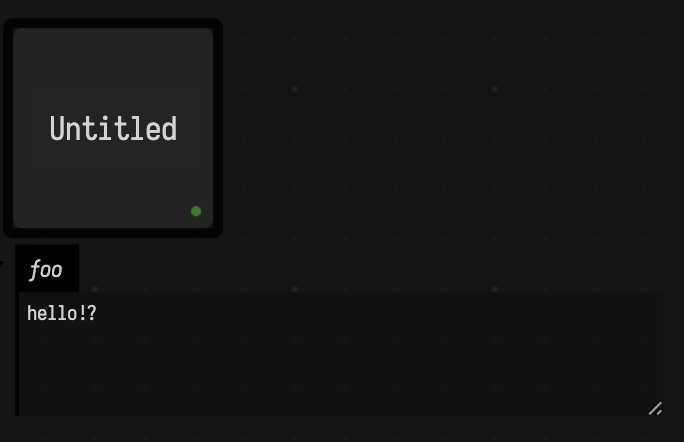
That output is straight HTML and therefore we can use this to embed charts, SVG files, and interactive controls. For example:
:::static
controlGroup("controls") {
    slider("name") { /*...*/ }
    colorPicker("myColor") { /*...*/ }
    vec2Control("the position") { /*...*/ }
    checkbox("flag") { /*...*/ }
    stringInput("label") { /*...*/ }
    checkbox("bar") { print(it) }
    stringInput("foo") { print(it) }
}
Yields:
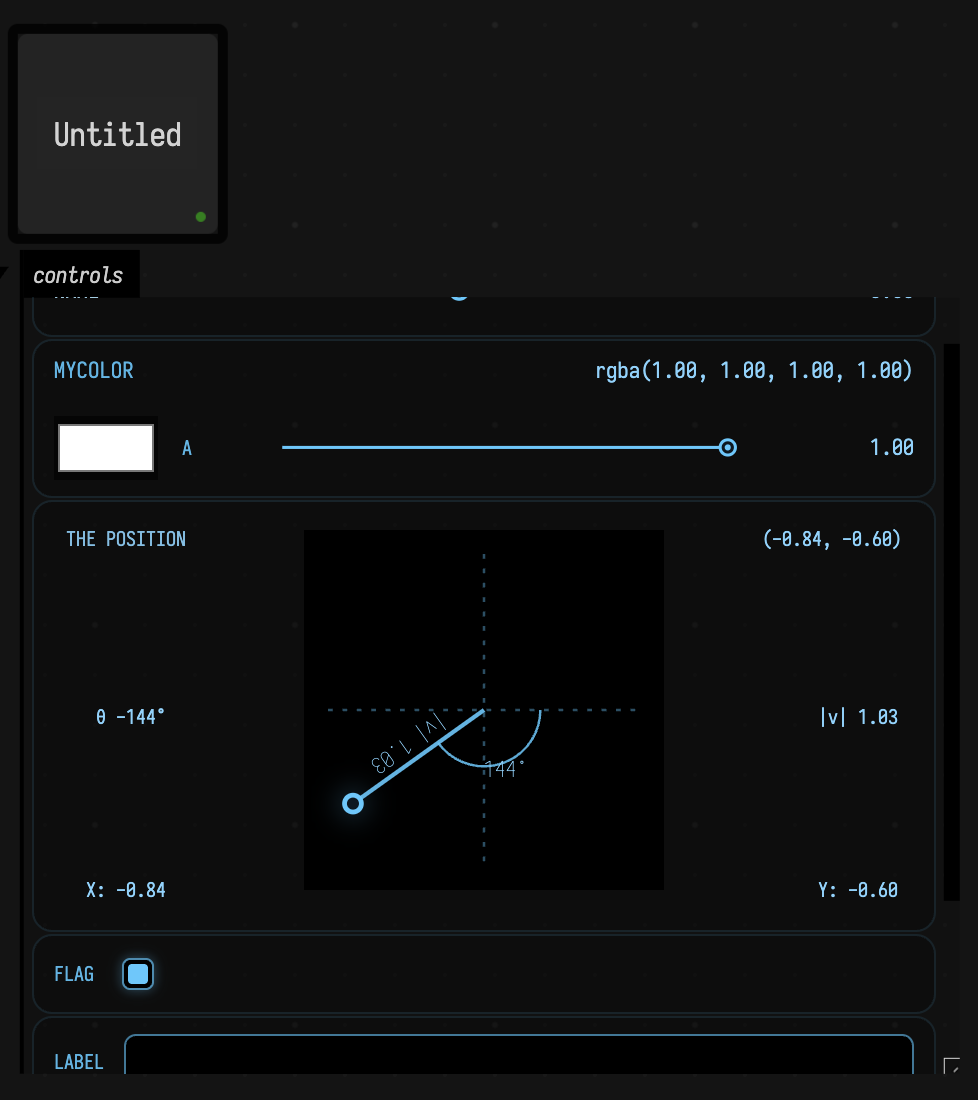
In Python you use print(...) and, in Jupyter there's a protocol for embedding interactive widgets and showing pixel and SVG based output. In JavaScript you typically use console.log(...) (or conspire to put HTML into the DOM). Swift uses print(...). C# uses Console.WriteLine(...) (or Console.Write(...)).
Python:
:::static
x = 42
print(x)
print("x =", x)
JavaScript:
:::static
const x = 42;
console.log(x);
console.log("x =", x);
Swift:
:::static
let x = 42
print(x)
print("x =", x)
C#:
:::static
using System;

var x = 42;
Console.WriteLine(x);
Console.WriteLine("x = " + x);
Strings and interpolation
Strings are text. Kotlin supports simple concatenation (+), but most Kotlin code uses string templates ($name and ${expression}) to embed values directly into text.
:::static
val who = "world"
val msg1 = "Hello, " + who
val msg2 = "Hello, $who"
val msg3 = "2 + 3 = ${2 + 3}"

// A multi-line string, with shared indentation removed by trimIndent().
val raw =
    """
    line 1
    line 2
    """
        .trimIndent()
Python interpolation (today) is typically f-strings (f"Hello, {who}"). JavaScript interpolation is template strings (`Hello, ${who}`).
Swift and C# both have built-in string interpolation too:
Swift:
:::static
let who = "world"
let msg = "Hello, \(who)"
C#:
:::static
var who = "world";
var msg = $"Hello, {who}";
Functions
Functions let you name a reusable piece of code. Kotlin function signatures start with fun, list parameters with types, and optionally include a return type.
:::static
fun add(a: Int, b: Int): Int {
    return a + b
}

fun add2(a: Int, b: Int) = a + b // expression body (type inferred)
Python uses def and indentation; type hints are optional. JavaScript uses function or arrow functions. Swift uses func and often feels close to Kotlin. C# uses methods/functions with explicit types (or var for locals).
Packages and imports
Kotlin files can declare a package at the top, and can import names so you can refer to them without writing long qualified paths.
:::static
package my.project
In Field you’ll often skip this because Field already imports its own drawing, math and utility names, so box code needs no import lines. You’ll still occasionally see import ... in examples.
Python, JavaScript, Swift, and C# all have the same basic idea (bring names into scope), just with different syntax:
Python:
:::static
import math
print(math.sqrt(9))
JavaScript:
:::static
import { readFile } from "node:fs/promises";
console.log(await readFile("./foo.txt", "utf8"));
Swift:
:::static
import Foundation
print("hi")
C#:
:::static
using System;
// In Unity you’ll also see: using UnityEngine;
Console.WriteLine("hi");
Default args and named args
As your functions get more parameters, it’s helpful if callers don’t need to specify every single one. Kotlin supports default values for parameters, and “named arguments” so you can pass things by name (and in any order).
:::static
fun greet(name: String = "world", punct: String = "!") {
    println("Hello, $name$punct")
}

greet()
greet("Ada")
greet(punct = "?", name = "Ada")
Python supports default values and named arguments directly. JavaScript has no named arguments; the usual substitute is “options object” parameters.
If you’re curious, here’s the same idea in Python (named args work like Kotlin) and in JavaScript using an options object (because JS doesn’t have named args).
Python:
:::static
def greet(name="world", punct="!"):
    print(f"Hello, {name}{punct}")

greet()
greet("Ada")
greet(punct="?", name="Ada")
JavaScript:
:::static
function greet({ name = "world", punct = "!" } = {}) {
  console.log(`Hello, ${name}${punct}`);
}

greet();
greet({ name: "Ada" });
greet({ punct: "?", name: "Ada" });
Swift and C# both support default values and named arguments too (Swift leans on named arguments heavily):
Swift:
:::static
func greet(name: String = "world", punct: String = "!") {
  print("Hello, \(name)\(punct)")
}

greet()
greet(name: "Ada")
greet(punct: "?", name: "Ada")
C#:
:::static
static void Greet(string name = "world", string punct = "!") {
  Console.WriteLine($"Hello, {name}{punct}");
}

Greet();
Greet("Ada");
Greet(punct: "?", name: "Ada");
if is an expression
In Kotlin, if can produce a value. That means you can assign the result of an if directly to a variable.
:::static
val x = 10
val label = if (x > 0) "positive" else "non-positive"
Python uses an inline-if expression (label = "positive" if x > 0 else "non-positive").
JavaScript and C# use the ternary operator; Swift has one too, as well as if expressions in recent
versions.
Loops and ranges
Loops repeat code. Kotlin’s for loop usually iterates over a range (like 0..3) or any “sequence of values”, and it has convenient syntax for common patterns like “up to but not including”.
Kotlin:
:::static
for (i in 0..3) {
    println(i) // 0,1,2,3
}

for (i in 0 until 3) {
    println(i) // 0,1,2
}

for (i in 6 downTo 0 step 2) {
    println(i) // 6,4,2,0
}
Field makes the common case even terser: 6 { ... } repeats the block six times, with it counting 0 to 5:
:::static
6 {
    print(it) // 0,1,2,3,4,5
}
And for interpolation between 0 and 1 inclusive
:::static
5.alphas {
    _print(it) // 0, 0.25, 0.5, 0.75, 1
}
Python loops over values; counting uses range(start, stop[, step]). JavaScript usually uses classic for (let i = ...; ...; ...) loops for counting.
Lists and maps
If you only learn two data structures in Kotlin for everyday Field scripting, learn List and Map. Kotlin distinguishes between read-only interfaces (List, Map) and mutable versions (MutableList, MutableMap). Write a list as a literal in square brackets, [10, 20, 30]; on its own that is a read-only List. Declare a type and the same brackets build that instead: val ys: MutableList<Int> = [1, 2, 3], or val s: Set<String> = ["a", "b"], and [] is an empty one. Maps are built with mapOf(...) and mutableMapOf(...).
:::static
val xs = [10, 20, 30]
val first = xs[0] // result: 10

val ys: MutableList<Int> = [1, 2, 3]
ys.add(4)
ys[0] = 99

// result: ys is [99, 2, 3, 4]

val m = mapOf("a" to 1, "b" to 2)
val a1 = m["a"] // result: 1 (type is Int?)
val c1 = m["c"] // result: null
val safe = m["c"] ?: 0 // result: 0

val mm = mutableMapOf("x" to 10)
mm["y"] = 20
mm["x"] = 11

// result: mm is {x=11, y=20}

for ((k, v) in mm) {
    println("$k -> $v")
}
The "a" to 1 syntax builds a key/value Pair, which is why mapOf("a" to 1) looks a little unusual at first. Also note that m["a"] returns a nullable (Int?) because the key might not exist.
Python:
:::static
xs = [10, 20, 30]
first = xs[0]  # result: 10

ys = [1, 2, 3]
ys.append(4)
ys[0] = 99
# result: ys is [99, 2, 3, 4]

m = {"a": 1, "b": 2}
a1 = m["a"]            # result: 1
c1 = m.get("c")        # result: None
safe = m.get("c", 0)   # result: 0

mm = {"x": 10}
mm["y"] = 20
mm["x"] = 11
# result: mm is {"x": 11, "y": 20}

for k, v in mm.items():
    print(f"{k} -> {v}")
JavaScript:
:::static
const xs = [10, 20, 30];
const first = xs[0]; // result: 10

const ys = [1, 2, 3];
ys.push(4);
ys[0] = 99;
// result: ys is [99, 2, 3, 4]

const m = new Map([["a", 1], ["b", 2]]);
const a1 = m.get("a");           // result: 1
const c1 = m.get("c");           // result: undefined
const safe = (m.get("c") ?? 0);  // result: 0

const mm = new Map([["x", 10]]);
mm.set("y", 20);
mm.set("x", 11);

for (const [k, v] of mm) {
  console.log(`${k} -> ${v}`);
}
Swift:
:::static
let xs = [10, 20, 30]
let first = xs[0] // result: 10

var ys = [1, 2, 3]
ys.append(4)
ys[0] = 99
// result: ys is [99, 2, 3, 4]

let m = ["a": 1, "b": 2]
let a1 = m["a"]         // result: Int?
let c1 = m["c"]         // result: nil
let safe = m["c"] ?? 0  // result: 0

var mm: [String: Int] = ["x": 10]
mm["y"] = 20
mm["x"] = 11

for (k, v) in mm {
  print("\(k) -> \(v)")
}
when (switch-like)
When you have more than two cases, Kotlin’s when is a clean way to choose between many branches. It can match exact values, multiple values, ranges, and even types.
:::static
fun describe(x: Any): String = when (x) {
    0 -> "zero"
    1,
    2 -> "one or two"
    in 3..10 -> "3 to 10"
    is String -> "a string of length ${x.length}"
    else -> "something else"
}
Swift’s closest equivalent is switch, which also supports ranges and pattern matching. C# has switch expressions with rich pattern matching as well.
Swift:
:::static
func describe(_ x: Any) -> String {
  switch x {
  case 0:
    return "zero"
  case 1, 2:
    return "one or two"
  case let i as Int where (3...10).contains(i):
    return "3 to 10"
  case let s as String:
    return "a string of length \(s.count)"
  default:
    return "something else"
  }
}
C#:
:::static
static string Describe(object x) => x switch
{
  0 => "zero",
  1 or 2 => "one or two",
  int i when i >= 3 && i <= 10 => "3 to 10",
  string s => $"a string of length {s.Length}",
  _ => "something else"
};
Lambdas (anonymous functions)
Sometimes you want a tiny function without giving it a name. Lambdas are “functions as values”: you can store them in variables, pass them around, and call them later.
Kotlin:
:::static
val inc = { x: Int -> x + 1 }

val add: (Int, Int) -> Int = { a, b -> a + b }
Kotlin lambda parameters come before ->, and Kotlin function types look like (A, B) -> R. JavaScript arrow functions are the closest equivalent to Kotlin lambdas; Python lambda is expression-only (no multi-line bodies in lambda).
The odd Kotlin-specific syntax is that if the last argument to a function is a lambda, Kotlin lets you write the lambda after the parentheses. If the lambda is the only argument, you can drop the parentheses entirely. That’s why a lot of Kotlin reads like thing { ... }.
:::static
val nums = [1, 2, 3]

val doubled = nums.map { it * 2 } // result: [2, 4, 6]

repeat(3) { i ->
    println(i) // result: prints 0, 1, 2 on separate lines
}

// If there's exactly one parameter, you can often use the implicit name `it`:
val odds = nums.filter { it % 2 == 1 } // result: [1, 3]
This syntactical feature trades readability for, well, something that's pretty puzzling the first time you discover it. One test of a language is whether you can introduce things that look like they are built into the language. In Kotlin it's not impossible to write something like iff(foo) {} if you define what iff is. Swift, Scala, Ruby and (kinda) Smalltalk among a few others have the same idea, but in most other languages you'd need a few more bits of punctuation somewhere.
Python and JavaScript don’t have a direct equivalent to “trailing braces”. In JS the callback stays inside the call (nums.map(x => x * 2)). In Python you’ll typically use a list comprehension ([x*2 for x in nums]) or pass a function in the normal way.
Swift calls lambdas “closures” and has very similar trailing-closure syntax. C# lambdas use =>, and the LINQ APIs (Select, Where, …) line up closely with Kotlin’s map/filter.
Swift:
:::static
let nums = [1, 2, 3]

let doubled = nums.map { $0 * 2 } // [2, 4, 6]
let odds = nums.filter { $0 % 2 == 1 } // [1, 3]

(0..<3).forEach { i in
  print(i)
}
C#:
:::static
using System;
using System.Linq;

var nums = new[] { 1, 2, 3 };

var doubled = nums.Select(x => x * 2).ToArray();
var odds = nums.Where(x => x % 2 == 1).ToArray();

foreach (var i in Enumerable.Range(0, 3))
  Console.WriteLine(i);
Building objects: apply and also (fluent setup)
In Field sketches you’ll often see patterns like fline { ... }. This is a small Field helper built on Kotlin’s apply { ... }, which lets you make an object, configure it, and return it in one expression.
This is especially handy when the methods you’re calling don’t return the object (for example, FLine, Field's line and path type, has a moveTo(...) that returns the new point rather than the line, so it can’t be chained in the usual fluent style).
:::static
// These three are equivalent: they all build the same FLine.

// 1) `fline { ... }`: preferred in Field. Inside the block, `this` is the object.
val f1 = fline {
    moveTo(50, 50)
    lineTo(200, 120)
    thickness = 4.0
    color = vec(1.0, 1.0, 1.0, 1.0)
}

// 2) `also { ... }` chaining: inside the block, `it` is the object.
val f2 =
    FLine()
        .also { it.moveTo(50, 50) }
        .also { it.lineTo(200, 120) }
        .also { it.thickness = 4.0 }
        .also { it.color = vec(1.0, 1.0, 1.0, 1.0) }

// 3) Explicit variable reuse.
val f3 = FLine()
f3.moveTo(50, 50)
f3.lineTo(200, 120)
f3.thickness = 4.0
f3.color = vec(1.0, 1.0, 1.0, 1.0)
Advanced things
The features below are very useful, but you can live-code a lot of Field sketches without bumping into them.
Nullability (?, ?., ?:, !!)
Sometimes a value might be “missing”. Kotlin makes that explicit in the type: String? means “a string or null”. Once you have a nullable type, Kotlin nudges you to handle it safely using ?. (“only if not null”) and ?: (“use a default”).
Kotlin:
:::static
val s1: String = "ok"
val s2: String? = null

val len1 = s1.length
val len2 = s2?.length // safe call -> Int?
val len3 = s2?.length ?: 0 // Elvis -> Int

// Avoid unless you *really* mean it:
// val boom = s2!!.length
Python uses None and explicit checks. JavaScript uses null/undefined; optional chaining (?.) and nullish coalescing (??) are close to Kotlin’s ?. and ?:.
In Python we have:
:::static
s2 = None
len2 = len(s2) if s2 is not None else 0
And in JavaScript:
:::static
const s2 = null;
const len2 = (s2?.length ?? 0);
Swift has Optional and uses the same core operators (?. and ??):
:::static
let s2: String? = nil
let len2 = s2?.count ?? 0
C# has nullable reference types and also uses ?. and ??:
:::static
string? s2 = null;
int len2 = s2?.Length ?? 0;
Equality: == vs ===
It’s common to ask “are these two values the same?”. Kotlin splits this into two ideas: == compares values, while === checks if two variables point at the same object. JavaScript has a similar-looking ===, but it means something different.
:::static
val a = "hi"
val b = "h" + "i"

val structural = (a == b) // compares values
val referential = (a === b) // same object reference?
In Python, == compares values, and is checks object identity:
:::static
a = "hi"
b = "h" + "i"

structural = (a == b)  # value equality
referential = (a is b) # same object?
In JavaScript, == coerces types, and === is strict equality (still not “object identity” in Kotlin’s === sense):
:::static
const a = "hi";
const b = "h" + "i";

const structural = (a === b);
const loose = (1 == "1");    // true (coerces)
const strict = (1 === "1"); // false
Swift uses == for value equality, and === for reference identity on class instances:
:::static
let a = "hi"
let b = "h" + "i"
let structural = (a == b)

final class C {}
let o1 = C()
let o2 = o1
let sameRef = (o1 === o2)
C# uses == for many comparisons (and it can be overloaded); for pure reference identity use ReferenceEquals:
:::static
var a = "hi";
var b = "h" + "i";
var structural = (a == b);

var o1 = new object();
var o2 = o1;
var sameRef = object.ReferenceEquals(o1, o2);
Exceptions and try as an expression
Exceptions are how Kotlin represents “something went wrong” at runtime. Kotlin’s try is also an expression, so you can compute a value and fall back to something sensible when parsing or conversion fails.
:::static
val n: Int = try {
    "123".toInt()
} catch (e: Exception) {
        0
    }
Python and JavaScript both use try/except or try/catch blocks in the usual statement style:
Python:
:::static
try:
    n = int("123")
except Exception:
    n = 0
JavaScript:
:::static
let n;
try {
  n = Number.parseInt("123", 10);
  if (Number.isNaN(n)) n = 0;
} catch (e) {
  n = 0;
}
Swift uses throws plus do/try/catch; a handy shorthand is try? which turns failures into nil:
:::static
enum ParseError: Error { case bad }

func parseInt(_ s: String) throws -> Int {
  guard let n = Int(s) else { throw ParseError.bad }
  return n
}

let n = (try? parseInt("123")) ?? 0
In C#, an idiomatic “no exceptions” parse is TryParse:
:::static
var n = int.TryParse("123", out var tmp) ? tmp : 0;
Smart casts (type checks that “stick”)
When you check a value’s type (for example, “is this a String?”), Kotlin often remembers that check inside the if block. This means you can use string operations without manual casting.
:::static
fun shout(x: Any) {
    if (x is String) {
        // inside this block, x is treated as String
        println(x.uppercase())
    }
}
Python and JavaScript can do similar checks, but they don’t “smart cast” the variable for you in quite the same way:
Python:
:::static
def shout(x):
    if isinstance(x, str):
        print(x.upper())
JavaScript:
:::static
function shout(x) {
  if (typeof x === "string") {
    console.log(x.toUpperCase());
  }
}
Swift typically uses as? to conditionally cast:
:::static
func shout(_ x: Any) {
  if let s = x as? String {
    print(s.uppercased())
  }
}
C# pattern matching binds a typed variable in the condition:
:::static
static void Shout(object x)
{
  if (x is string s)
    Console.WriteLine(s.ToUpper());
}
Classes: primary constructor + properties
Classes let you bundle data and behavior. Kotlin has a compact syntax where constructor parameters can become properties right in the class header (val name: String).
:::static
class Person(val name: String, var age: Int)

val p = Person("Ada", 36)
println(p.name)
p.age += 1
Python typically uses an __init__ constructor and stores fields on self. JavaScript uses class { constructor(...) { ... } } and stores fields on this.
Here are direct equivalents. In the Python version, the name: str / age: int parts are optional type hints; delete them if you haven’t seen annotations before.
Python:
:::static
class Person:
    def __init__(self, name: str, age: int):
        self.name = name
        self.age = age
JavaScript:
:::static
class Person {
  constructor(name, age) {
    this.name = name;
    this.age = age;
  }
}
Swift has class and struct with initializers; C# has classes with auto-properties:
Swift:
:::static
final class Person {
  let name: String
  var age: Int

  init(name: String, age: Int) {
    self.name = name
    self.age = age
  }
}
C#:
:::static
public class Person
{
  public string Name { get; }
  public int Age { get; set; }

  public Person(string name, int age)
  {
    Name = name;
    Age = age;
  }
}
data class (struct-like)
If your class is mostly “some values that travel together”, Kotlin’s data class is a convenient shorthand. It generates common boilerplate like equality and a copy function.
:::static
data class Vec2(val x: Double, val y: Double)

val a = Vec2(1.0, 2.0)
val b = a.copy(y = 5.0)

// destructuring
val (x, y) = b
data class gives you generated toString, equals, hashCode, copy, and destructuring.
Python’s closest equivalent is usually a @dataclass (optional, but very common), and JavaScript often uses a plain object or a small class depending on taste:
Python:
:::static
from dataclasses import dataclass, replace

@dataclass(frozen=True)
class Vec2:
  x: float
  y: float

a = Vec2(1.0, 2.0)
b = replace(a, y=5.0)  # like Kotlin copy
x, y = b.x, b.y
JavaScript:
:::static
// plain object (common)
const a = { x: 1.0, y: 2.0 };
const b = { ...a, y: 5.0 }; // "copy" with one field changed
const { x, y } = b;
Swift’s closest equivalent is a struct (often Equatable) — copying is usually “by value”:
Swift:
:::static
struct Vec2: Equatable {
  var x: Double
  var y: Double
}

let a = Vec2(x: 1.0, y: 2.0)
var b = a
b.y = 5.0
let (x, y) = (b.x, b.y)
C#’s closest equivalent is a record, with with-expressions and deconstruction:
C#:
:::static
public record Vec2(double X, double Y);

var a = new Vec2(1.0, 2.0);
var b = a with { Y = 5.0 };
var (x, y) = b;
Where to go next
This page covers the Kotlin you meet most often in Field. For the rest of the language, these are good places to start:
- A tour of Kotlin — JetBrains' own introduction: short chapters with exercises you can run in the browser, from beginner to intermediate.
- Kotlin Koans — small exercises, each a failing test you make pass, also in the browser. Good for building fluency once the syntax is familiar.
- Idioms — one page of "the Kotlin way to do X", useful for turning Python or JavaScript habits into Kotlin.
- Scope functions —
let,run,with,applyandalsoside by side. These come up constantly in Field code, and the differences between them are hard to guess.