Beat and pitch analysis
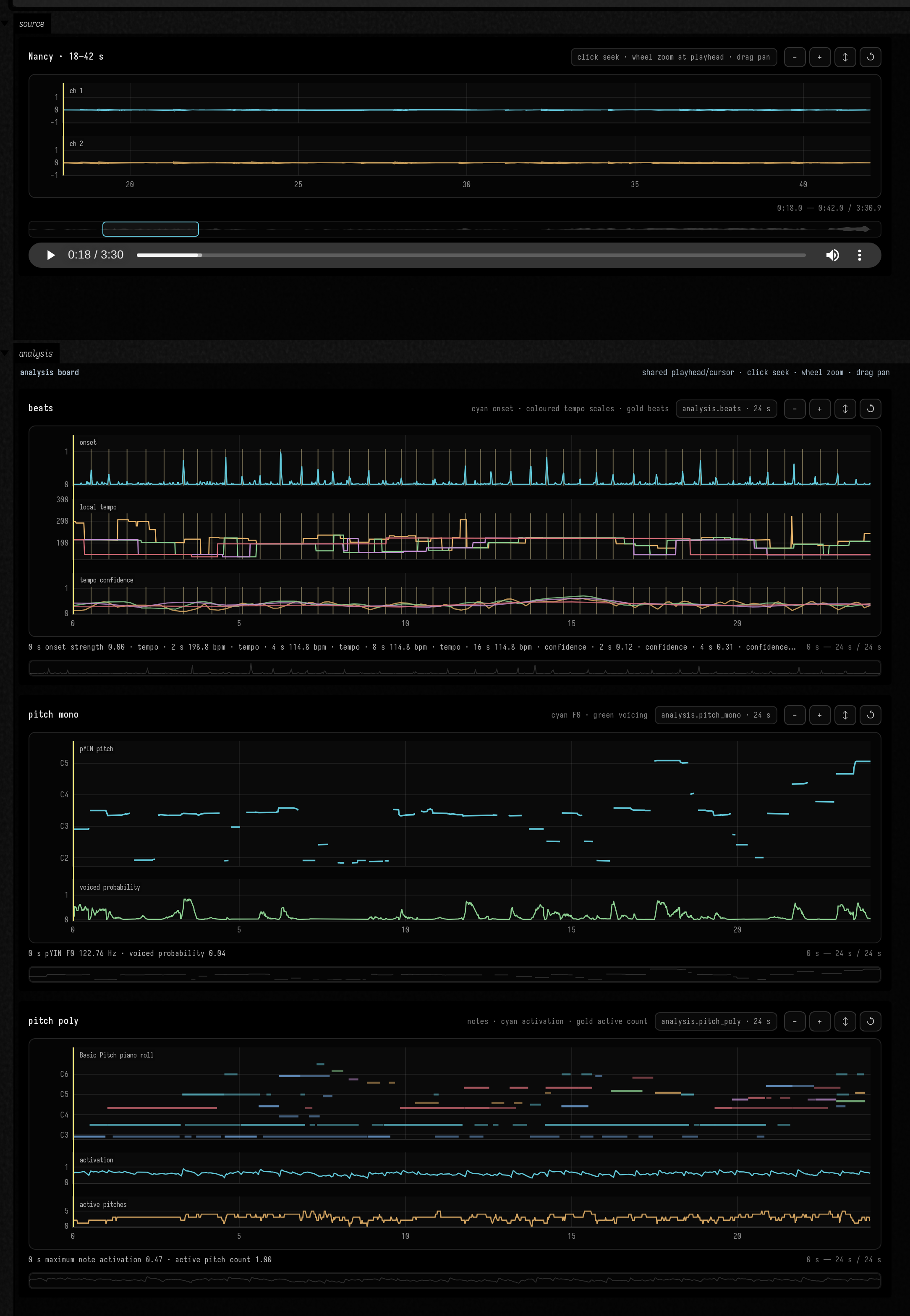
Where are the beats in a recording? What notes are sounding? Field can analyse both and show the
results alongside the waveform. analysis.beats measures tempo over several window lengths, so
you can see how the estimate changes with the timescale.
For pitch, choose the analysis that fits your recording. analysis.pitch_mono tracks a single
voice as a continuous F0 with a voicing probability; analysis.pitch_poly finds discrete notes in
chords and returns them as events and a MIDI file.
To run the examples on this page, open the audio_ai_analysis starting point.
| Field operation | Implementation | What comes back |
|---|---|---|
analysis.beats |
librosa beat tracking and multi-window tempograms | onset envelope, beat markers, local BPM and confidence at every requested scale |
analysis.pitch_mono |
librosa pYIN | monophonic F0, MIDI pitch, voiced flag and voiced probability |
analysis.pitch_poly |
Spotify Basic Pitch | note events, activation tensors, pitch bends and a MIDI artifact |
All three are durable, cached jobs on the same machinery as generation, and each asks for one
result rather than a family of candidates: a fixed window with fixed parameters has a single
answer, so there is nothing here to browse by seed. A request names an exact AssetRegion and the
recording on disk is never modified. Progress arrives on the WebSocket and in the embedded job
monitor, and the finished job points at a compressed NPZ asset instead of putting a large tensor
into Field's output JSON.
The views
Every panel draws a preview the server has downsampled; the full-resolution arrays stay in the NPZ asset. The beat view separates onset, tempo and confidence lanes; pYIN shows pitch against a note grid with its voicing track; Basic Pitch combines a piano roll with maximum activation and active-pitch count. Hover, zoom and pan one panel and the others follow. A live board can join the source player on the same shared timeline: playback drives every analysis cursor, hovering either surface highlights the other, and clicking an analysis plot seeks the recording.
Running all three from one box
The source waveform appears immediately. The monitor and three replace-in-place status cards report each job while the worker runs, and a job becomes a panel on the analysis board only once it has finished successfully.
:::fold imports and client
import java.util.concurrent.CancellationException
import java.util.concurrent.CompletableFuture

val client = cached { FieldAudioClient() }
:::endfold
val start = 18.0
val duration = 24.0
val timeSync = "nancy-analysis"
display("all jobs", fieldAudioJobMonitor(heightPixels = 330))

runAsync(
    onResult = { results: List<AnalysisResult> ->
        displayClear("all jobs")
        for (label in ["beats", "monophonic pitch", "polyphonic pitch"]) displayClear("$label job")
        displayOpen("source")
        display(
            "analysis",
            analysisDashboardHtml(
                results,
                width = 1040,
                panelHeight = 250,
                syncGroup = timeSync,
                timeOffsetSeconds = start,
            ),
        )
        displayOpen("analysis")
    },
    onError = { failure ->
        markdown("analysis error", "Analysis failed: ${(failure.message ?: failure.toString()).md}")
    },
) {
    val showSource = progress<String> { display("source", it) }
    // HTTP continuations run elsewhere; every analysis still belongs to this box run.
    val run = RunScope.current()
    val lookup = client.assetByFilename("*Nancy*")
    onCancel { lookup.cancel(true) }
    lookup.thenCompose { source ->
        if (future.isDone) throw CancellationException("run ended")

        val region = AssetRegion(source.id, start, duration)
        val canonical =
            source.representations.firstOrNull { it.role == "canonical_project" }
                ?: source.representations.first { it.mediaType in ["audio/wav", "audio/x-wav"] }
        showSource(
            canonical.audioVisualizerHtml(
                label = "Nancy · 18–42 s",
                options = AudioVisualizerOptions(
                    width = 1040,
                    waveformHeight = 110,
                    initialStartSeconds = start,
                    initialDurationSeconds = duration,
                    initialPositionSeconds = start,
                    syncGroup = timeSync,
                ),
            ),
        )

        :::fold submit and track the three analysis jobs
        val requests = [
            "beats" to multiScaleBeatAnalysis(region, requestedBy = "field:analysis-example"),
            "monophonic pitch" to monophonicPitchAnalysis(region, requestedBy = "field:analysis-example"),
            "polyphonic pitch" to polyphonicPitchAnalysis(region, requestedBy = "field:analysis-example"),
        ]
        val analyses = requests.map { (label, request) ->
            RunScope.withCurrent(run) {
                    client.trackAnalysis(
                        request,
                        onAccepted = { display("$label job", fieldAudioJobStatusHtml(it)) },
                        onProgress = { job, event -> display("$label job", fieldAudioJobStatusHtml(job, event)) },
                        onCompleted = { display("$label job", fieldAudioJobStatusHtml(it)) },
                        onError = {}, // The outer operation reports failure once.
                    )
                }
                .also { pending -> onCancel { pending.cancel(true) } }
        }
        CompletableFuture.allOf(*analyses.toTypedArray()).thenApply { analyses.map { it.join() } }
        :::endfold
    }
}
An unchanged request still goes through trackAnalysis, but the service resolves it to
the content-addressed cached result. Change the source range or an algorithm parameter to create a
new operation. Stop or rerun closes this run’s progress subscriptions and suppresses stale output;
the durable service jobs and their cached results remain available. AnalysisResult.data is the complete NPZ representation;
AnalysisResult.artifacts includes Basic Pitch MIDI where applicable; client.download(...)
copies either immutable asset when local numerical work needs the full resolution.
See also the general audio visualizers, the gesture board and speech embeddings.