Field language extensions
Write a little language inside a Kotlin string and you can give it an editor of its own: syntax highlighting, error markers, completion and decorations that show values as they move through the code. A language extension is a small JavaScript object registered in the browser; RectSL and StackSL both use this mechanism. You can add one without changing Field's editor.
Loading
The registry is available in the editor page as:
window.FieldLanguageExtensionsIt is also exposed through convenience functions:
window.installLanguageExtensions(editor, monaco)
window.updateLanguageExtensions(editor)
window.buildLanguageContextPayload(editor, resolveContext, options)
window.fieldLanguageCompletionItems(editor, model, position, context)
window.findLanguageEmbeddedRegions(model, optionalLanguageOrExtensionId)
The core editor calls installLanguageExtensions(...) when Monaco starts and
updateLanguageExtensions(...) when the selected property or model language
changes. An out-of-tree extension that loads after Monaco starts can still call
FieldLanguageExtensions.register(...) and then update the current editor.
Extension contract
An extension is a plain JavaScript object:
FieldLanguageExtensions.register({
  id: "rectsl",
  label: "RectSL",
  languageIds: ["kotlin", "rectsl"],

  install(editor, monaco, registry) {
    // Add editor actions or event listeners.
  },

  findEmbeddedRegions(model) {
    // Return source regions embedded in the current Monaco model.
    return []
  },

  updateEmbeddedHighlight(editor, context) {
    // Set Monaco decorations for embedded source regions.
  },

  updateDiagnostics(editor, context) {
    // Set Monaco markers.
  },

  updateFlowLens(editor, context) {
    // Set decorations for value flow, consumers, producers, or timing links.
  },

  buildContextPayload(editor, resolveContext, options) {
    // Return { key, editor, html, isLiveValue } for the lower-left context badge.
    return null
  },

  provideCompletionItems(editor, model, position, context) {
    // Return FieldSuggest-compatible completion items when the cursor is inside this language.
    return { suggestions: [] }
  }
})
context contains:
{
  editor,
  model,
  monaco,
  registry,
  options
}
Each hook is optional. An error thrown by a hook is caught and reported to the browser console, so a broken extension does not take down the editor.
Embedded regions
An extension starts by finding the regions of its language in the editor's text. Each region gives character offsets from the start of the text, so the other hooks can turn a position in your language back into a line and column:
{
  source: "0 0 xy 1 square",
  bodyStart: 125,
  bodyEnd: 142,
  headerStart: 108,
  headerEnd: 115
}
The registry annotates returned regions with:
{
  languageExtensionId: "rectsl",
  languageLabel: "RectSL"
}
RectSL sketch
This example detects Kotlin triple-quoted strings whose first non-empty line is
#rectsl.
const rectslHeader = /^(?:[ \t]*(?:\r?\n|$))*[ \t]*#rectsl\b[^\n]*(?:\r?\n|$)/i

function findRectSLEmbeddedRegions(model) {
  if (!model || model.getLanguageId() !== "kotlin") return []

  const source = model.getValue()
  const regions = []
  const triple = /"""/g
  let match
  while ((match = triple.exec(source)) !== null) {
    const contentStart = match.index + 3
    const close = source.indexOf('"""', contentStart)
    if (close < 0) break

    const content = source.slice(contentStart, close)
    const header = rectslHeader.exec(content)
    if (header) {
      const headerOffset = contentStart + header[0].search(/#rectsl\b/i)
      regions.push({
        source: content.slice(header[0].length),
        bodyStart: contentStart + header[0].length,
        bodyEnd: close,
        headerStart: headerOffset,
        headerEnd: headerOffset + "#rectsl".length,
      })
    }
    triple.lastIndex = close + 3
  }
  return regions
}
Register it:
FieldLanguageExtensions.register({
  id: "rectsl",
  label: "RectSL",
  languageIds: ["kotlin"],
  findEmbeddedRegions: findRectSLEmbeddedRegions,

  updateEmbeddedHighlight(editor, { model, monaco }) {
    const decorations = []
    for (const region of findRectSLEmbeddedRegions(model)) {
      const start = model.getPositionAt(region.headerStart)
      const end = model.getPositionAt(region.headerEnd)
      decorations.push({
        range: new monaco.Range(start.lineNumber, start.column, end.lineNumber, end.column),
        options: {
          inlineClassName: "afield-stacksl-token-directive",
          hoverMessage: { value: "Embedded RectSL" },
        },
      })
    }
    const state = editor._rectslDecorations || (editor._rectslDecorations = editor.createDecorationsCollection([]))
    state.set(decorations)
  },

  updateDiagnostics(editor, { model, monaco }) {
    const markers = []
    for (const region of findRectSLEmbeddedRegions(model)) {
      // Call an out-of-tree RectSL parser/compiler here and convert diagnostics
      // to Monaco marker ranges using model.getPositionAt(...).
    }
    monaco.editor.setModelMarkers(model, "rectsl-diagnostics", markers)
  },
})
Field ships this extension. A Kotlin box holding a #rectsl string, open in the editor:
val scene =
    """
#rectsl
->wall 16 8 abstract
->background 0x0c1024

"sun" rect
  4 4 ->wh
  0xff7a1a solid ->fill
  '( 0=-5  2=5  4=-5 ) ->x

"band" rect
  16 1 ->wh
  0x2a8cff solid ->fill
"""
println(scene.lines().size)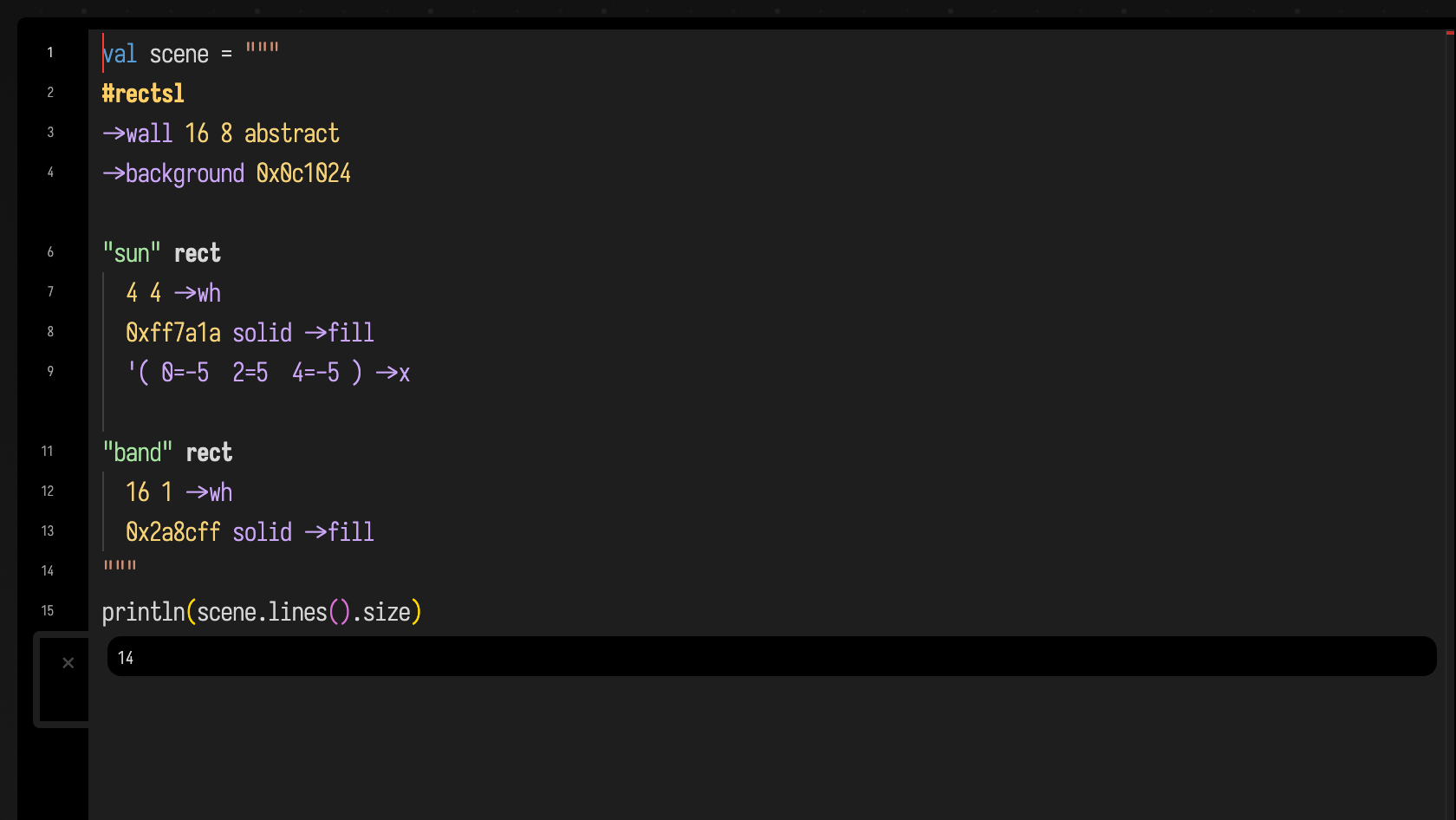
Flow and context lenses
updateFlowLens(...) draws relationships in the text: which word consumes a
value from the stack, which line produces a track, which rectangles are copies of
each other. Draw them as Monaco decorations, kept in a collection that belongs to
the editor:
const state = editor._rectslFlow || (editor._rectslFlow = editor.createDecorationsCollection([]))
state.set(decorations)
buildContextPayload(...) fills the small badge at the lower left of the editor
with whatever is useful about the cursor's position:
buildContextPayload(editor, resolveContext) {
  const model = editor.getModel()
  const position = editor.getPosition()
  const offset = model.getOffsetAt(position)
  const region = findRectSLEmbeddedRegions(model).find((r) => r.bodyStart <= offset && offset <= r.bodyEnd)
  if (!region) return null

  const resolved = resolveContext ? resolveContext(editor) : null
  const key = `${resolved?.uid || "rectsl"}::${model.getVersionId()}::${offset}`
  return {
    key,
    editor,
    isLiveValue: false,
    html: `<div class="afield-stacksl-context"><strong>RectSL</strong> track/keyframe context goes here</div>`,
  }
}
For RectSL, the badge could show what the word under the cursor does to the stack, the selected rectangle, or a track's value at the current time.
Completion items
provideCompletionItems(...) answers completion inside your language before Field
asks the Kotlin compiler. A small language usually knows its own vocabulary, so
it can answer on its own. The suggestions appear in Field's completion popup:
provideCompletionItems(editor, model, position, { monaco }) {
  const region = findRectSLEmbeddedRegions(model).find((r) => {
    const offset = model.getOffsetAt(position)
    return r.bodyStart <= offset && offset <= r.bodyEnd
  })
  if (!region) return { suggestions: [] }

  return {
    suggestions: [{
      label: "->square",
      insertText: "->square",
      kind: monaco.languages.CompletionItemKind.Function,
      detail: "size --",
      documentation: {
        value: "**->square** `size --`\n\nSet width and height to the same value.",
        isTrusted: true,
      },
      data: { rectslEffect: "mutator" },
    }]
  }
}
RectSL keeps one table of word documentation and uses it for completion, token colours and the context badge, so all three describe the same language.
Line notes: what a line did
Rest the cursor on a line of a box's program, or open completion there, and Field shows a note about that line beside the cursor and at the top of the completion popup. The note says what the line came to, with its results in bold. Under it, a smaller line says where that answer came from and how old it is, and some languages add a picture. A language gives notes by registering a provider for the property its programs live in, so any language can have them. These are the ones Field's own languages give:
| language | the note for a line | picture |
|---|---|---|
| StackSL | the stage the line ends, drawn, or the value it stores in a mark | the stage |
| RectSL | the scene built up to the line's statement, the rectangles it makes outlined | the scene |
| ForthField | the data stack after the line on the last run, drawn rather than written, and the words it defined | the stack, top uppermost |
| Clojure | what each top-level form evaluated to on the last run, and its type | — |
| Python | what each top-level statement came to on the last run: an expression's value, the name it assigned, what it defined, or just that it ran | — |
| FieldML | the value each top-level let bound on the last run, and its type; the final expression's value |
— |
| Kotlin | the value each top-level val or var held when the last run finished |
— |
| Morpho | the # main line: the grown circuit's gates, cells and depth; a LUT line: the gates it became; a def: how many times it was expanded, at which widths, and the gates beneath it |
— |
| Nano | how many times the instruction ran on the last run, the registers after it last did, and what it output; or that it never ran | — |
| Datalog | a rule: the facts its body derives in the box's model; a query: its answers; a fact: whether it is in the model and which rules read it | the derived rows, as a table |
| Pd | an object: what it is fed by and feeds; an [s] or [r]: the last value through its name, live from the playing patch; a #X connect line: the two ends it joins |
— |
The ForthField and Python and Lua pages show notes in the editor; the Clojure and Datalog pages say what theirs contain.
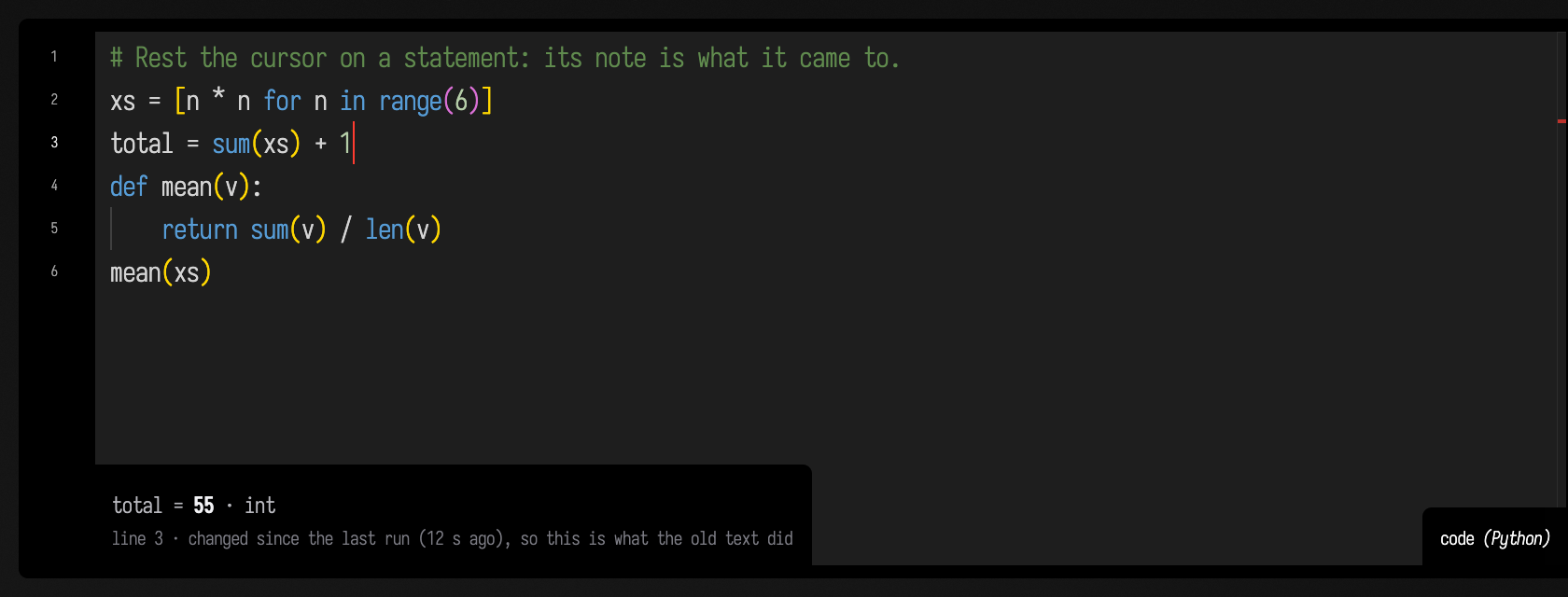
A note never runs your code. StackSL and RectSL can say what part of a program does without running it, because a partial StackSL program is still a pure shader and a partial RectSL scene a pure description. Forth, Clojure, Python, FieldML, Kotlin, Morpho and Nano programs print, draw, define things and change state that outlives the run, so their notes are recorded: as the box runs, each top-level step reports what it came to, and the note reads that record back. The note says so ("last run, 12 s ago"), and it stays with its line when you edit above it. Running the box again updates the note.
When the line itself has changed since the box ran, the note says so before it tells you what the old
text did. Here the cell below has run once, and + 1 has just been typed on the end of line 3:
A Forth or Clojure run that failed marks the line it stopped on, and Forth marks the lines after it as
not reached. Datalog needs no record: a Datalog box accumulates one model, and asking it is pure; a rule
you have edited but not run is reported as not in the model rather than answered for. Directives such as
#reset are never run for a note.
Recording never runs code your program did not. A Clojure value is printed with a limited
*print-length*, and a lazy sequence that nothing has realised is named rather than printed, since
printing it would realise it. A Python note prints a value only when it is a builtin number, a short
string, or a small list, tuple, set or dict of those. Anything else, such as a DataFrame, a tensor or
an object of your own class, is named by its type, because printing it would run its __repr__.
Setting AFIELD_PYTHON_LINE_NOTES=0 in Field's environment turns Python's recording off.
Recording costs a little for each top-level step (a Forth line, a Clojure form, a Python statement, a
FieldML let) and nothing for each turn of a loop inside one, so a long-running loop costs no more
than a short one.
A Kotlin line that declares nothing, such as a println, has no note, because a run keeps only the
values of what it declares. Inside a Kotlin box, a #stacksl or #rectsl string gets its own
language's notes.
A box's AI chat can read the same notes through its ReadLineNotes tool, which returns each line's
note as one sentence, with its picture as an image.
When to promote
Keep a language as an extension while its syntax is still changing. Build it into Field when one of these becomes true:
- A box property should be written in it, with its own editor language.
- Its compiler or runtime should ship with Field.
- Its error messages need information only the server has.
- Other parts of Field need to call it directly.
A language built into Field: FieldML
FieldML is the language of a whole box, not a region inside a string, so it does not use the extension registry. It gets the same three things another way:
- Highlighting comes from a Monaco language of its own, fieldml.js, with FieldML's keywords, type names, operators, brackets and comment forms.
- Completion and hover come from the server, which answers from the same
types the compiler uses. Each suggestion shows its real type, and after a
|>the functions that accept the piped value come first. - Error markers are real type errors, from compiling the box when it runs.
An extension is one .js file that is easy to change. A built-in language has
a compiler and a type checker to keep up to date, and in return its completion
knows what each name means. The FieldML Cheatsheet
shows the language.